There are two parts to setting up the Scheduler on Cloud.
1. Adding the Scheduler XML to the built in Jobrunner, and scheduling when to run it
2. Activating the Scheduler from Support>Scheduler.
Adding the Scheduler XML to Jobrunner:
To enable the scheduler on the cloud, in the customer's live database head to Support>WKP Forms, highlight "Maint" and select "Launch". This opens Jobrunner in their Space Manager as this is now built in.
The scheduler itself is an XML that is run inside Jobrunner on Cloud.
The XML can be found here:
https://radicalsys.sharepoint.com/:u:/s/RADicalSystems/IQAqP0cHrP0ccrEqLDTwqwylAQNr6xa-wakUUJSt6N3jZBE?e=shXKR6
Now that Jobrunner is open, you need to add the XML.
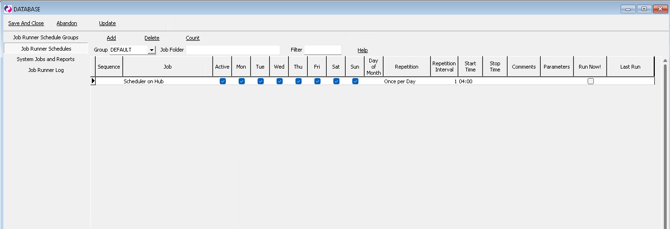
Now you need to "Add" the Scheduler job and schedule it to run daily at 4 am, or any time agreed with the customer.
Here is an image of what it should look like once configured:
2. Activating the Scheduler
After adding the Scheduler XML and setting the times to run, you need to actually activate it.
3. Activating settings for the scheduler in SQL
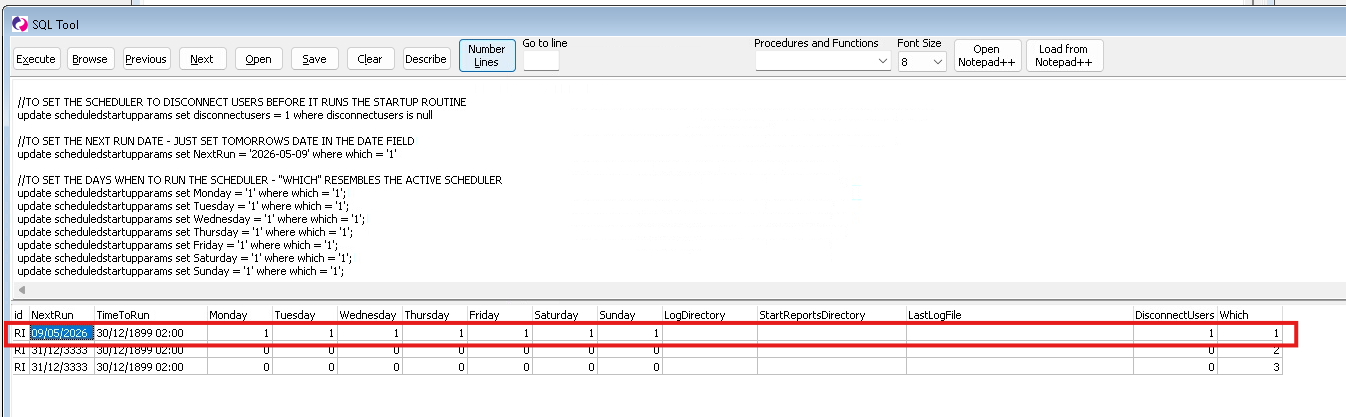
At this time there are some settings that are not visible in the scheduler on cloud, so these need to be configured using SQL. *This will change in the near future and these settings will be visible within Support>Scheduler.
These settings are:
- Next Run Date
- Disconnect Users
- Days to Run (although this is set above, it also needs to be set in the scheduledstartupparams table
SQL BELOW
//TO SET THE SCHEDULER TO DISCONNECT USERS BEFORE IT RUNS THE STARTUP ROUTINEupdate scheduledstartupparams set disconnectusers = 1 where disconnectusers is null
//TO SET THE NEXT RUN DATE - JUST SET TOMORROWS DATE IN THE DATE FIELDupdate scheduledstartupparams set NextRun = '2026-05-09' where which = '1'
//TO SET THE DAYS WHEN TO RUN THE SCHEDULER - "WHICH" RESEMBLES THE ACTIVE SCHEDULERupdate scheduledstartupparams set Monday = '1' where which = '1';update scheduledstartupparams set Tuesday = '1' where which = '1';update scheduledstartupparams set Wednesday = '1' where which = '1';update scheduledstartupparams set Thursday = '1' where which = '1';update scheduledstartupparams set Friday = '1' where which = '1';update scheduledstartupparams set Saturday = '1' where which = '1';update scheduledstartupparams set Sunday = '1' where which = '1';
Example: