Audience
- Admins
- Support staff
Spaceman Web Menu
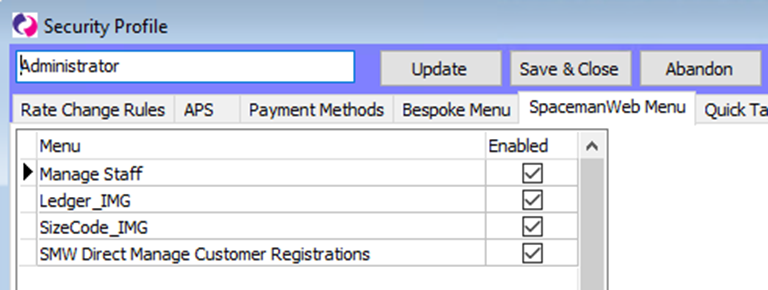
Go to Settings → Security Profiles, then expand the security profile you wish to view or update.
In the “SpacemanWeb Menu” tab, you will be allowed to enable the jobs to view from the drop-down menu at the top of Spaceman Desktop. When you reopen Spaceman Desktop again (as a user of the edited security profile), the SpacemanWeb drop down menu will give you the list of Enabled jobs.
You can do the same in the “Bespoke Menu” tab for the Bespoke drop-down menu.
Rights relating to Spaceman Web
In the security profile window, the Rights tab gives you accessibility options for Spaceman Desktop. These can affect what powers a user has in modifying Spaceman Web. Here are some points about a select few rights related to Spaceman Web.
- Having the selected Right “Custom Settings” (under ***Settings Menu***) will give a user access to the Spaceman Web custom settings pages, and so they will be able to change the settings.
- Information about the custom settings can be found in sections and
- Having the selected Right “XML Jobs” (under ***Menus***) will give a user access to the XML Jobs menu (Support → XML Jobs), which will have certain jobs concerning Spaceman Web that they can then Run from the menu.
- Having the selected Rights “SpacemanWeb XML Bespoke Menu” or “XML Bespoke Menu” (both under ***Settings Menu***) will give a user access to the SpacemanWeb drop-down menu or the Bespoke XML drop-down menu.
- The jobs listed in each menu depend on what is enabled for the same Security Profile in the SpacemanWeb Menu and the Bespoke XML Menu.
- Having the selected Right “Sites” will give a user access to Maintenance → Sites, allowing them to view the site’s SMTP settings, document templates, access interface script, custom settings, and the site details. The Site Details include a few fields that relate to Spaceman Web, mostly Spaceman Shop specifically.
- Having the selected Right “Support Menu” will give a user access to the Support drop-down menu, which lets them access the WPK Forms menu. From which, the Spaceman Web Manager form and the Spaceman Web Config form can be accessed from.
- The “Spaceman Web” Right gives a user access to the Settings → SpacemanWeb sub-menu, which is currently unused.
- It is also worth mentioning that users with the Rights “Users/Security Profiles” (***Menus***), “Security Profiles” (***Settings Menu***), “Change user security profile” (***Staff***) may be able to change their rights, giving or taking away their own access to the above points.