
Audience
- Admins
- Support staff
Configuring SpacemanWeb
Upon SpacemanWeb installation, a number of new custom settings pages are added, to give Admins additional configuration options.
Go to:
Settings → Custom Settings → Page “SpacemanWeb” 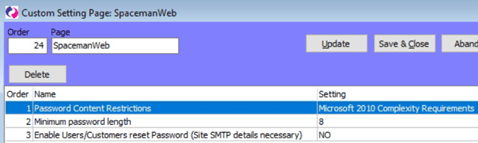
- Password Content Restrictions - Changes the password restrictions. Choice between:
-
- “Must Contain Numbers And Letters” – At least one uppercase or lowercase character, at least one number.
-
- “Microsoft 2010 Complexity Requirements” – At least one uppercase character, at least one lowercase character, at least one number, at least one special character.
- By default, set to “Microsoft 2010 Complexity Requirements"
- Minimum password length - The minimum password length in number of characters allowed. By default, this is set to 8 characters.
- Enable Users/Customers reset Password (Site SMTP details necessary)
- When set to YES, customer accounts have access to a button to change their password themselves. So even with an expired password, they can login and change their password without calling the site to reset their password for them. If set to YES, the site must be sure to have working SMTP details because the password changing functionality will send a confirmation email to the customer’s email address. By default, this is set to NO.