Audience
- Admins
- Support staff
Site SMTP Email settings
Spaceman Shop will not work if it is unable to email customers.
Go to: Site window → Settings tab
Add your provider’s SMTP details in the “Email Settings” section.
- SMTP Server, SMTP Username, SMTP Password, SMTP Port, and the TLS checkbox
Add the Map location
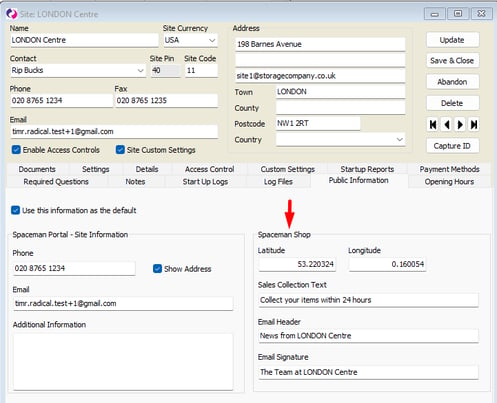
Spaceman Shop requires the longitude and latitude to be set for every site that is enabled in Spaceman Shop so that the site map can be displayed.
Go to: Site window → Public Information Tab
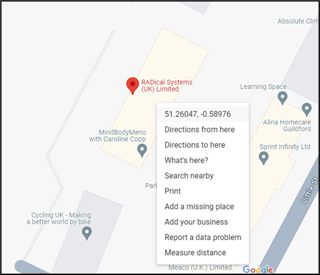
On Google Maps, right click the location you want the site pin on the map to be, then click the Coordinates at the top of the right-click actions menu to copy them. (Latitude, Longitude)
- Enter the numbers into the “Latitude” and “Longitude” fields for the site, respectively.
Sales Collection Text
Text entered for this field will show on the hire selection, sales items selection, basket, and summary pages of Spaceman Shop.
Go to: Site window → Public Information Tab → Sales Collection Text
Email Header and Signature
Two fields allow you to add customised site text to the emails sent out through Spaceman Shop
Go to: Site window → Public Information Tab
- “Email Header” – Text will show up at the top of emails.
- “Email Signature” – Text will show up at the end of emails.