
Audience
- Admins
- Support staff
SMW Manager
SMW manager is how the site has the means to enable or disable any items, sites or sizecodes from Spaceman Shop.
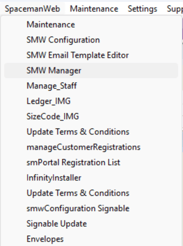
Go to: Spaceman Desktop → SpacemanWeb → SMW Manager
Set Site to Show Online
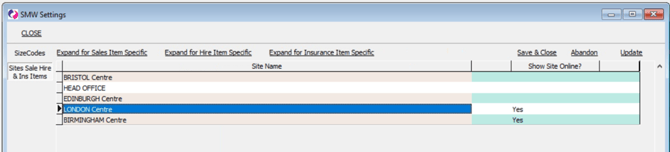
Go to: SMW Manager → Sites Sale Hire & Ins Items
Set the “Show Site Online?” column to “Yes” for any site to be used in Spaceman Shop. Set it to "No" to remove it from Spaceman Shop.
Set Sizecodes to Show Online
Go to: SMW Manager → SizeCodes
Click on a sizecode row and select “Expand for Site specific” (or double click the Sizecode row)
Set sizecode “Show Online?” to “Yes” and “Cut-off Number” if needed. “Show Online?” to "No" to remove sizecode from Shop
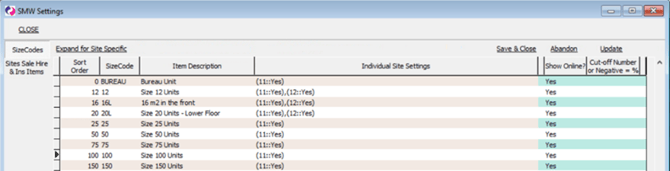
- A positive Cut-off Number will act as a hard-coded number of units available on the site of that sizecode at which to stop showing the choice of sizecode.
- negative Cut-off Number (with a - before it) will act as a percentage cut-off. So, at that percentage of available units in the total number of units on that site of that sizecode, the choice of sizecode will stop showing.
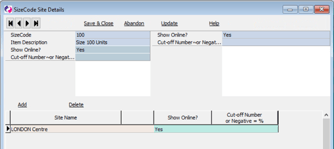
Click “Add” to add sites for the sizecode.
Note: A site will only be able to be added if units of that sizecode exist on the site.
Set Sale, Hire, and Insurance items Show Online
Go to: SMW Manager → Sites Sale Hire & Ins Items
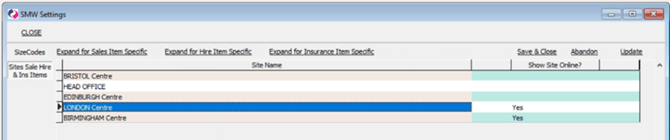
Select your site and click on “Expand for [Sales/Hire/Insurance] Item Specific” to open a window for the ledgeritem type of your choice.
Hire and Sale ledgeritems can only be added if they have stock enabled. You can do this on the ledgeritems menu.
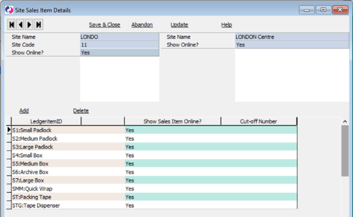
Click “Add” to add a ledgeritem to Spaceman Shop for your selected site.
Make sure to set “Show [Sales/Hire/Insurance] Item Online?” to "Yes" for the added item. Set this to "No" to remove the item from Shop.
Add a “Cut-off Number” if needed. (No negative numbers)
Item will stop showing if Stock of the ledgeritem is below that number
Hiding Units from Spaceman Shop with Unit Status
There are two ways a unit status can cause a unit to be excluded from Spaceman Shop. Both are configured in Spaceman Desktop under Settings → Unit Status.
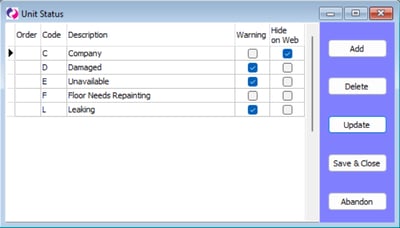
- Hide on Web — Units with a status that has "Hide on Web" enabled are completely excluded from Spaceman Shop. Customers will not see them when browsing, and they will not be counted as available for booking online. Use this for units that should never appear on Spaceman Shop regardless of availability — for example, units reserved for walk-in customers or units that should only be sold in person.
- Warning — Units with a status that has "Warning" enabled are treated as occupied by Spaceman Shop and will not appear as available to book. Use this for units that are temporarily out of service — for example, units under maintenance or awaiting repair.
Note: Both are status-level settings, not per-unit settings. All units assigned to a status with either option enabled will be affected. To target individual units, create a dedicated status for that purpose.
If a unit is not appearing in Spaceman Shop when it should be, or is appearing when it should not, check the unit’s current status in Spaceman Desktop and whether that status has "Hide on Web" or "Warning" enabled.