
Audience
• Admins
• Support staff
Spaceman Shop Custom Settings
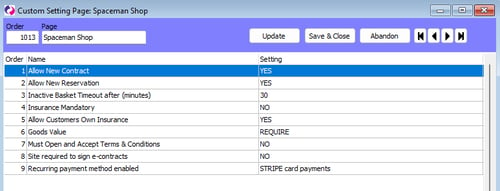
Go to: Settings → Custom Settings → Page "Spaceman Shop"
-
Allow New Contract
- If set to NO, will hide the "Book" button, removing the ability for customers to create contracts on Spaceman Shop.
- By default, set to YES.
- At least one of Allow New Contract and Allow New Reservation must be set to YES.
-
Allow New Reservation
- If set to NO, will hide the "Reserve" button, removing the ability for customers to create reservations on Spaceman Shop.
- By default, set to YES.
- At least one of Allow New Contract and Allow New Reservation must be set to YES.
-
Unit Softlock Timeout after (minutes)
- The number of minutes for which the unit selected during Spaceman Shop will be held for. If a unit is softlocked, it cannot be selected by other users going through Spaceman Shop.
- By default, the number of minutes is set to 10.
-
Insurance Mandatory
- If set to YES then customers will not be able to refuse Insurance on their booking.
- If set to NO they will have the option for "No Insurance" when booking.
- By default, set to YES.
-
Allow Customers Own Insurance
- If set to YES then customers will have the option to say they have their own insurance plan when booking. They may continue through Spaceman Shop without selecting an insurance plan from the site, even if the Insurance Mandatory setting is set to YES.
- By default, this is set to NO.
-
Goods Value
- If set to SHOW, a Goods Value field will show on Spaceman Shop when Book is selected (New contract).
- If set to REQUIRE, the shown field will be required to be filled in.
- By default, set to HIDE.
-
Must Open and Accept Terms & Conditions
- If set to YES, customers booking on Spaceman Shop will be required to open, scroll to the bottom of the Terms and Conditions PDF, and accept them before they can pay.
- If set to NO, customers can accept the Terms and Conditions without opening the PDF.
- By default, set to NO.
-
Site required to sign e-contracts
- Concerns the Signable emails. If set to YES, then once the customer has signed and submitted their contract on Signable, a request to sign will be sent to the site's email. Set this to YES if the contract template has site signature labels set up.
- By default, set to NO.
-
Recurring payment method enabled
- Specifies whether to set up recurring payments to a contract made in Spaceman Shop.
- Options: "Stripe Card Payments" or "Other"
- When set to "Stripe Card Payments", contracts created in Spaceman Shop will have their payment method set to enable recurring Stripe payments.
- By default, set to "Stripe Card Payments".