
Audience
- Admins
- Support staff
How It works
Customer Experience
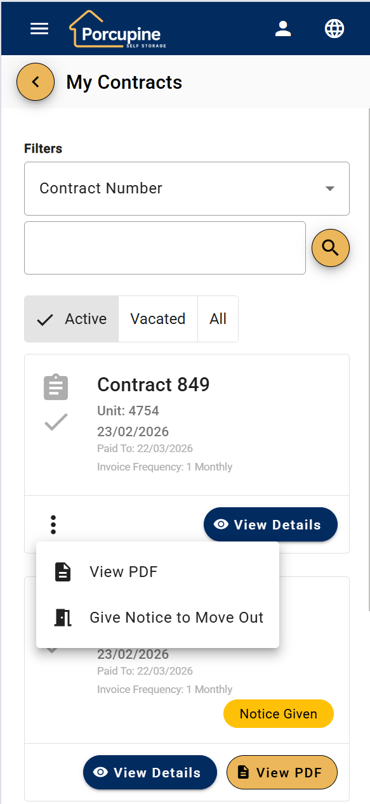
1. Access the Feature
• Customer logs into Spaceman Portal
• Navigates to their Contracts section
• Selects the contract they want to terminate
• Clicks the "Give Notice to Move Out" button
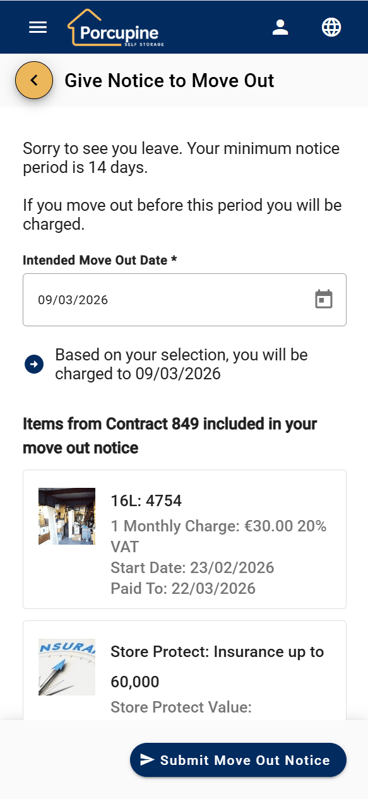
2. Submit Notice
• A form appears asking for their Intended Move Out Date
• The system displays the date they will be charged up to based on their notice period
• Customer submits the notice
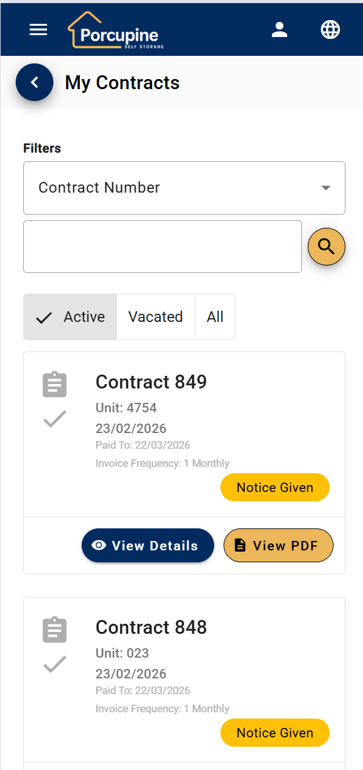
3. Confirmation
• Customer receives an automatic email confirmation showing:
◦ Notice submission confirmation
◦ Expected leave date
◦ Charged-up-to date
• The contract is immediately updated in their portal view showing notice has been applied
Operator Experience
1. Automatic Notification
• Site operators receive an email notification immediately when a customer gives notice
• Email includes all relevant notice details
2. System Integration
• Notice is automatically applied to Spaceman Desktop
3. Visibility
• Operators can see the notice in Spaceman Desktop immediately
• No manual data entry required
Key Benefits
For Customers
• 24/7 Availability - Give notice at any time without calling during business hours
• Instant Confirmation - Receive immediate email confirmation
• Clear Communication - Know exactly when they'll be charged up to
• Self-Service - No need to wait on hold or wait for callback
For Operators
• Reduced Phone Calls - Fewer inbound calls for notice submissions
• Automatic Documentation - All notice details recorded automatically
• Immediate Notification - Operators are informed in real-time
• Accurate Record-Keeping - Eliminates manual entry errors
Important Details
Current Limitations
• Whole Contract Only - Customers can currently only give notice on entire contracts, not individual items
• Future Enhancement - Add ability to cancel notice given
Support Scenarios & FAQs
"Can I give notice on just one unit?"
Answer: Currently, this feature only supports giving notice on entire contracts. If a customer needs to terminate individual items while keeping others active, they should contact the site office directly to process a partial vacation.
"When will I be charged until?"
Answer: The system automatically calculates and displays the charged-up-to date based on your notice period before you submit. This date is also included in your confirmation email.
"I didn't receive a confirmation email"
Answer: Please check your spam/junk folder. If you still can't find it, please verify your email address is correct in your account settings. You can also see the notice status reflected immediately in your Contracts view in the portal.
"Can I cancel a notice I just gave?"
Answer: Please contact the site office directly to discuss cancelling or modifying your notice. This cannot currently be done through the portal.
"Does giving notice happen immediately in Space Manager?"
Answer: Yes, the notice is applied to Spaceman Desktop automatically as soon as the customer submits it. Operators receive an email notification immediately.Document Prepared: 23 February 2026
Feature Release: Version 2.51.0217.1045
Feature Release Date: 24 February 2026
Last Updated: 23 February 2026