
New Features
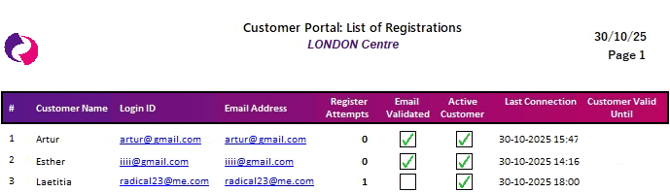
Portal registration records report
Stay informed and in control with the improved customer activity report now seamlessly available in Spaceman Desktop. This update gives self storage professionals quick, clear insights into who is using the Spaceman Portal, how active your customers are, and when their access is valid grouped and displayed in a user-friendly way. With streamlined layouts, more meaningful names, and powerful filtering options, staying on top of customer engagement has never been easier. Enjoy greater clarity, reliability, and peace of mind so you can make better decisions and keep your business running smoothly every day.
Improvements to existing features
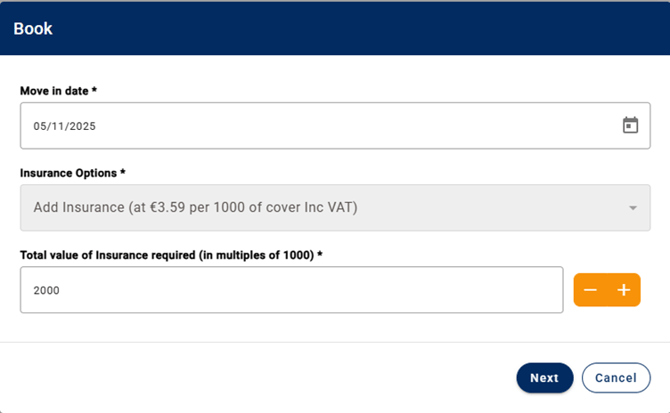
Simpler button redesign on insurance quantity
Selecting insurance for bookings in Spaceman Shop is now simpler and more intuitive. Customers can easily adjust their insurance value using familiar plus and minus buttons just like everywhere else in their booking journey. This ensures a consistent, hassle-free experience across mobile and desktop, helping customers make confident choices quickly and reducing manual entry mistakes.
Updated headings
Spaceman Shop now uses clear, intuitive “Book” and “Reserve” headings in pop-up windows, bringing terminology in line with the rest of their booking journey. This update removes any confusion around payment timing, making it easier for customers to understand their choices and boosting confidence at every step. Enjoy a smoother, more consistent experience so customers always know exactly what to do next.
Added a clear message when login details are wrong
The latest update brings clarity to the login experience. Now, when entering an incorrect username or password, users see a straightforward message Unable to login. Your username and password do not match, instead of a generic error alert.
Improved UI on transaction page across platforms
The Transactions page now displays icons and fonts consistently across both desktop and mobile devices. Users can immediately see the full icons and enjoy a cohesive, polished look throughout each transaction card. This improvement removes distracting visual inconsistencies and makes information easier to scan, ensuring a more intuitive, reliable, and professional experience every time you access your transactions.
Bug fixes
Error showing for the second user after the first user logs out
This fix ensures a smooth transition when different users log in to the Shop on shared devices, or when a booking is cancelled mid session. After one user logs out mid-booking, the system fully resets, so the next user can start a new booking session without any errors or leftover information. This creates a seamless, reliable experience for everyone.
Added an alert when Terms and Conditions export fails
This update gives operators instant feedback when updating Terms and Conditions. Clearly alerting them to any errors, confirming successful uploads, and allowing them to preview the new PDF right away. This saves time, removes guesswork, and ensures your Terms and Conditions are always up-to-date and correct, making everyday tasks more efficient and reliable.
Clear message when a stripe payment is below the minimum amount
Customers now receive a clear message if their payment is below Stripe’s minimum amount, so they immediately understand why the transaction didn’t go through. This transparency reduces confusion and helps ensure a smoother, more reliable payment experience for everyone.
New booking button added when Shop is disabled
With this update, users only see the “New Booking” button when online booking is available ensuring the Portal is always clear and intuitive. When booking is disabled, occupiers now receive a helpful message instead of a non-working button, reducing confusion and creating a smoother, more user-friendly experience.
Clear message when hub is unavaliable
When the Hub is unavailable, all login pages now display a clear error report instead of a confusing message. This update ensures users and support teams always receive helpful information to quickly understand and resolve access issues, making problem-solving faster and more transparent.
Identification numbers not validated on registration
ID numbers entered during registration are now properly checked for accuracy when required, ensuring a smoother and more secure onboarding process for new occupiers while reducing the risk of errors.
Spaceman Desktop
3.4.70
New Features
Stop late charges from creating unwanted BACS transactions
With this update, late charges no longer trigger unwanted BACs transactions even if BACs is the chosen payment method. This change gives operators greater control, ensures cleaner records, and helps maintain accurate, streamlined financial management.
Clear trail when changing the documentation site for a customer
Now, whenever staff members change the documentation site for a customer, contract, or unit, the system automatically records an exception event. This enhancement boosts visibility and accountability, making it easier for operators to track changes and maintain a clear audit trail.
Increased customer identification field to 250 characters
The Customer Identification field now supports up to 250 characters, allowing longer and more detailed IDs to be safely recorded removing data entry headaches and making customer management easier for your team.
Bugs
Access settings are picked up from correct site
Now, when you create a new customer, their access settings automatically use the rules from the correct site, not the site you’re logged into. This ensures each customer’s details are accurate from the start, making site management smoother and more dependable.
Misc. Charge and Misc. Credit buttons visible on Public sale
Operators can now process Misc Charges and Credits on Public Sale accounts at any time, no matter if the menu icon is shown or hidden making transaction management simpler, more flexible, and free of unnecessary restrictions.
Fixed report view
Switching between ‘order’ and ‘report’ columns in the Report window no longer causes the view to jump or hide important data, making it easier to keep all the information you need in sight and work more efficiently.
Simpler way to add invoice comments on Misc. Charges
You can now add Invoice Comments when processing Misc Charges from the Contract Transaction tab, making it easier to clarify charges and keep your invoicing records complete and transparent.
BACS reference number column easier to see
The BACS Reference column now stays at the correct width after rejecting payments, so reference numbers are always fully visible and you no longer need to manually resize columns making your workflow smoother and more efficient.
Actioned Dairy dates will no longer pop up
Diary dates that have already been actioned will no longer pop up, helping you avoid unnecessary interruptions and stay focused on what matters most.
No zero invoices created when processing deffered charges
The system now prevents zero-value invoices from being created when processing deferred charges or credits and gives clear guidance, so only valid items are invoiced helping you avoid confusion and keep billing accurate.
Fixed formatting error on Late Letter notes on Startup
Late Letter previews at startup now display notes in the correct format, so you can easily read all information and make quick decisions without hassle or confusion.