
Jump to a section here...
New Features
Ability to resend Signable contract in Spaceman Portal
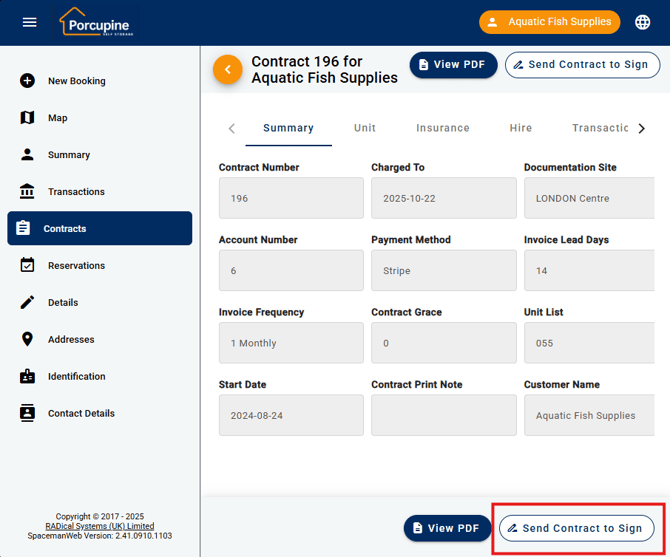
Experience total control and convenience with Spaceman Portal's latest upgrade. Customers using the Spaceman Portal can now easily re-request their contract for signing if they have not received it via Signable. When a customer views their contract details page and the contract remains unsigned, a new “Sign Contract” button will appear provided Signable integration is enabled. This enhancement empowers customers to resend the contract themselves, removing the need to contact site staff and ensuring a smoother, more independent signing process.
Improvements to existing Features
Spaceman Portal Summary redesign
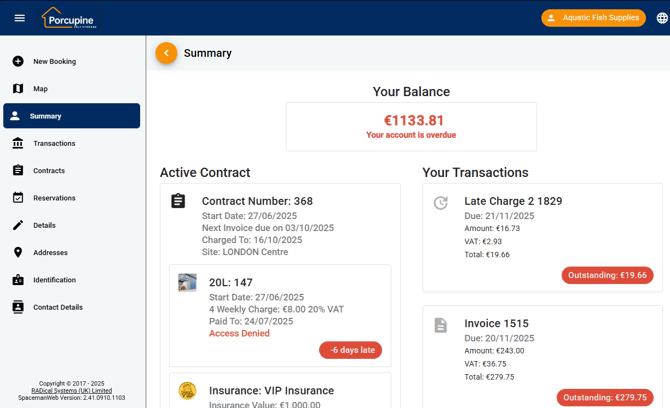
Introducing a brand-new way to manage your account: our redesigned Spaceman Portal dashboard for your customers. The refreshed summary page now acts as your personal control center, instantly presenting your current balance, active contracts, reservations, and outstanding invoices each in a dedicated, easy-to-navigate card. Key information is always just a click away, seamlessly linking you to contract details, reservations, or open transactions for fast, efficient account management.
This new dashboard experience adapts to your needs sections with no relevant items quietly disappear, and important alerts, such as account overdue notices, are displayed front and center so nothing slips through the cracks. Whether you’re on top of everything or need to take urgent action, the new Portal summary empowers you with a clear, interactive view of your storage journey. Take advantage of greater visibility, transparency, and control every time you in!
Images now fit better on pages
Images now always appear neat and tidy, filling their frames and displaying as perfect squares in lists. The grid layout also shows more items side by side on larger screens, making everything look cleaner, more consistent, and easier to browse.
Bug Fixes
Added drop-down options to the registration field
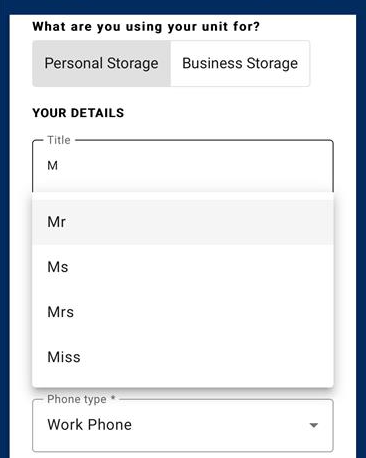
The Title field on customer registration now features an intuitive autocomplete dropdown, making it faster and easier for users to select a title from the standard Space Manager list or enter a custom value. This enhancement not only streamlines onboarding for new customers but also promotes consistent data entry and a more polished, professional experience for both users and sales teams.
Red Border for required fields
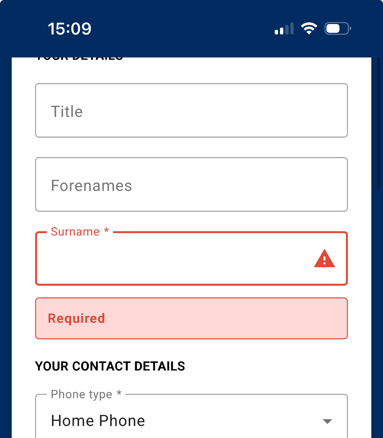
We’ve fixed a visual bug where form field labels appeared crossed out by the input box border when errors occurred. Labels now have a red border making it clear and easy to read, enhancing the user experience in both Spaceman Portal and Shop.
Customer notification when their password expires
We’ve resolved an issue where Customer account holders were not notified when their passwords had expired. Now, when a Customer logs in with an expired password, they receive a clear message detailing the password expiry status, how many days and login attempts remain before the account is locked, and guidance to update their password. This update ensures Customer users get the same level of security notification as User and Owner accounts, helping prevent confusion and accidental lockouts.
Terms and Conditions UI changes
We’ve resolved several inconsistencies with the Terms & Conditions functionality on the Spaceman Shop payment page to deliver a more intuitive and visually consistent occupier experience. Action buttons related to Terms & Conditions - such as “Close” and “View Terms & Conditions” - now consistently use the Primary colour for clarity, and button states align with the “Must View T&C” setting: the Accept button is immediately enabled if viewing is not required, and once enabled after viewing, it stays enabled even when scrolling.
We’ve also standardised all references to “Terms & Conditions” across the app, including template and setting names, for a unified and professional appearance. These updates help ensure actions are clearer and more predictable, reinforcing trust and ease of use throughout the payment process.
Improved efficiency of Spaceman Portal Contract List
We’ve made it much quicker and easier to review customer contract lists in the Portal, even for accounts with lots of contracts. Thanks to these improvements, pages now load faster and more smoothly, giving occupiers a reliable, hassle-free way to access their contract history no matter how many contracts they have. This update brings greater speed and confidence to your day-to-day work, helping you stay organised and efficient at every step.
Improved functionality of Spaceman Shop send email functionality
You’ll now reliably receive error notification emails if something goes wrong with contracts, reservations, payments, or access control actions. Updates behind the scenes mean you’re quickly alerted to any issues, helping you stay informed and respond faster.
Improved Summary Page on Spaceman Shop
We have fixed a bug where the summary page briefly changed or hid elements just before redirecting customers to the portal after finishing a contract or reservation. Session data is now cleared only after the redirect, so the summary page remains stable and consistent, eliminating confusion and preventing customers from seeing transient or misleading information.
Improvements to "Update Terms and Conditions" Job
The Update Terms & Conditions job now properly recognizes templates set under “File Name” for each site, and will skip or report clear errors if a template is missing. This ensures T&C templates can be reliably updated from both Spaceman Shop and Desktop, improving overall visibility and ease of management.
Reduced from two pop ups to one when Terms and Conditions don't exist
We’ve fixed an issue where multiple error popups could briefly appear if the Terms & Conditions template was missing; now, only a single, clear error message is displayed for a smoother user experience on the Shop payment page.
Fixed insurance field displaying previous value when going back on size selection
We’ve fixed a bug on the Insurance Selection page where previously entered values could appear after navigating back and forth during booking; now, insurance values are always reset to zero each time you revisit the page, eliminating confusion and ensuring accurate information for occupiers.
Stripe installer fix
The Spaceman installer now correctly detects and uses existing Stripe site questions with the proper naming conventions, avoiding the creation of duplicate keys and ensuring clear, streamlined Stripe configuration across your system.
Fixed special characters not saving when setting the password
A bug preventing passwords with certain special characters (such as apostrophes) from being set correctly in Spaceman Portal has been fixed. Now, either passwords with all standard special characters can be used, or the system will display a clear validation message if an unsupported character is entered, ensuring reliable password updates for staff accounts.
Reworked page formatting on mobile
The contract details page in the Spaceman Portal has been enhanced for a smoother mobile experience: long contract titles are now automatically shortened with an ellipsis to maintain a clean look, and horizontal scrolling has been removed to keep all key information fully visible. This update ensures every user no matter the device or contract length, can enjoy a streamlined, professional view of their contracts at all times.
Spaceman Desktop
3.4.65
New Features
New universal way to hide units from your website
Operators can now easily control which units show up on the website just by setting a unit’s status. This new option makes it simpler to manage online listings, so your website always matches your business’s needs and only displays the units you want customers to see.
New setting added to give more control over Mail Merge rights
A security right has been added to control access to the “Change Enquiry State” button on the Mailmerge tab, allowing administrators to restrict who can perform bulk status updates. Additionally, a confirmation prompt now appears before making changes, clearly warning users that the update will affect all customers selected on the Selection tab. These improvements help prevent accidental changes and give teams greater control and accountability when updating customer statuses.
Bugs
Email and phone number validation rework
The customer creation process ensures new phone numbers and email addresses are checked against set criteria before a customer can be added. If an entry does not meet the requirements, a clear message is displayed and the record cannot be saved until corrected. This enhancement safeguards data quality and eliminates the risk of invalid contact details, saving valuable time and resources on future data cleanup.
Reworked log-off settings, making them more reliable
The “Minutes before Disconnection” and “Minutes before Logoff” settings now function reliably even after a user logs out and logs back in without closing the program. Idle timeout and related notifications will trigger as expected every session, ensuring consistent enforcement of session policies for a smoother and more secure user experience.
Fixed attachment functionality
Attaching a JPG to a customer record in Spaceman Desktop now copies the file instead of moving it, ensuring the original image remains in its source location. This fix allows users to add supporting documents to customer records without worrying about losing or relocating their original files, making the attachment process both safer and more convenient.
Enhanced credit note functionality
When the Charged To date is moved backwards on a contract and rectification credit notes are created for multiple billing periods, the system now prompts the user to enter a reason for the credit. This reason is recorded along with the credit note, ensuring all adjustments are properly documented and compliant with requirements, while improving accuracy and traceability for contract billing changes.
Pre-selected the correct site on reservation creation
Site selection in the reservation process has been updated to ensure the correct location is always preselected and retained based on the unit chosen. Only active sites are now available for selection, preventing closed locations from appearing in the reservation workflow. This fix eliminates site mismatches, prevents related errors, and ensures accurate reporting for reservations at each store.
Fixed template error when the same template was selected
The system now correctly handles cases where the same filename is set for both the Statement template in Spaceman Desktop and Spaceman Portal default Report File in site settings. This resolves the previous “file not found” error and allows templates to be easily reused in multiple fields, improving reliability and simplifying template management.
Fixed the incorrect invoice date after changing the charge to date
The system now checks unit start dates during invoice generation and startup routines to ensure that only units active within the invoiced period are charged. Units with a start date after the invoice period will no longer be included, resulting in accurate and fair billing for all contract updates.
Automatic Cleanup of Blobstore Records When Switching to File Path
Now, when you switch how a site template or access script is stored in Spaceman Desktop, any old database records are automatically cleaned up. This means templates will always be stored in the right place, making it simpler and more reliable to manage them in both the desktop and portal versions.
3.4.66
New Features
Transactions tab accurately reflects which user processed the bounce
Bounce transactions now correctly display the processing user by using the StaffID when it is provided; if not, the system defaults to the currently logged-in user. This ensures that the Transactions tab accurately reflects who processed each bounce, improving audit trails and accountability for payment-related actions.
Bugs
Future contract vacates are easier to read
Invoices created for future contract vacates no longer display unnecessary ‘Corrected Document’ links unless they are actually credit notes that correct prior documents. This update ensures only relevant documents include correction links, making it easier for users to print and manage contract paperwork without confusion.
Startup logs now display disconnected users
Now, whenever you choose to disconnect users, the Startup Logs will automatically update to show that this action has been taken. This means you can easily see in the log when users have been disconnected, making it simple for teams and administrators to keep track of what’s happened and be sure that everything is working as expected.
Removed unnecessary error on Misc. Credit
You can now easily choose a new payment method when processing Misc. Credits, even if the customer’s usual payment option isn’t allowed. This update means you won’t get stuck with confusing errors and can finish the process smoothly, just as you can with Misc. Charges.
Effortless Customer Record Management
To enhance your daily workflow in Spaceman Cloud, we’ve updated how customer records open ensuring the Keyname field is no longer automatically highlighted. This improvement reduces the risk of accidental changes and lets you focus on what matters most: managing your customers with ease and confidence. It’s another way RADical Systems is removing interruptions and delivering a more intuitive, reliable experience for every self storage professional.
Consistent Refund and Payment Workflow
We’ve refined the refund process to match the payment experience you’re already familiar with. Now, when processing a refund, any automated actions such as updating dates through XML jobs happen first, before you’re asked about printing the refund document. This enhancement ensures a smoother, more predictable workflow, reducing potential confusion and allowing you to finalise refunds with confidence and clarity every time. As always, RADical Systems is committed to making daily operations more intuitive for self storage professionals.
Reliable Report Saving for Startup by Region
We’ve addressed an issue to ensure that reports generated via Startup by Region are now always saved securely in your system when database storage is selected. With this update, your critical regional reports are reliably recorded, preventing data loss and giving you greater peace of mind. This improvement supports seamless operations and helps self storage professionals keep complete, accessible records at all times.
Improved Rental Ledger Item Setup
We’ve resolved an issue where the “Stock Enabled” option could be selected when creating new rental ledger items. Now, this setting is correctly disabled for rental items from the start, ensuring rental ledger items are never accidentally marked as stockable. This enhancement eliminates the risk of configuration errors and gives you greater confidence and control when managing your inventory and setting up new charges.
Accurate Numeric Entry in Questionnaires
We’ve resolved an issue that caused certain decimal values in numeric questionnaires to change unexpectedly after saving. With this fix, numbers now save and display exactly as entered, ensuring you get consistent and reliable results every time. This improvement helps you maintain precise records and removes any uncertainty from data entry in your day-to-day operations.
Map Palette Preferences Preserved
We’ve fixed an issue that caused custom map palettes items like additional colours for unique unit statuses to revert to default during Spaceman Cloud updates. With this improvement, your tailored map settings now stay intact through every update, ensuring your customised views remain consistent and reliable, no matter how your system evolves. This enhancement supports your preferred way of working and maintains the clarity you depend on for day-to-day operations.